Managing Data Lakes
Create, configure, and manage data lakes with permissions, scheduling, and cleanup options
Overview
Data lakes are the primary document storage and retrieval layer in OpenRails. Each data lake contains documents, a vector collection, and optional knowledge graph data. Data lakes support permissions, scheduled ingestion, and automated cleanup.
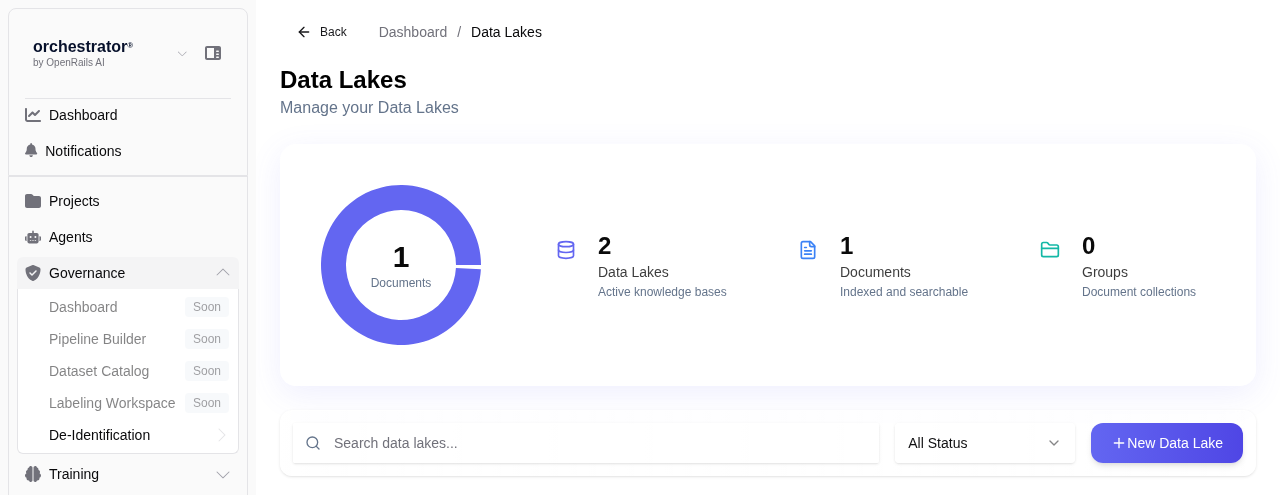
Create a Data Lake
Navigate to Data Lakes
From the sidebar, click Data Lakes to view the data lake list for your project.
Click "New Data Lake"
Click the New Data Lake button to open the creation form.
Enter Data Lake Details
Fill in the required fields:
- Name — A descriptive name (e.g., "Product Documentation Q1 2026")
- Description — Brief summary of the data lake's contents and purpose
Configure Chunking Settings
Set the chunking parameters for document ingestion:
- Chunk Size — Configurable characters per chunk
- Chunk Overlap — Configurable overlapping characters between chunks
Set Permissions
Configure access permissions to control who can view and modify the data lake:
- Read Access — Users/roles that can view documents and use the data lake for RAG
- Write Access — Users/roles that can upload, edit, and delete documents
- Admin Access — Users/roles that can modify data lake settings and permissions
Save
Click Save to create the data lake. You can now upload documents to it.
Scheduling
Data lakes support scheduled operations for automated management:
- Scheduled Ingestion — Automatically re-ingest documents from connected sources on a cron schedule
- Cleanup Tasks — Remove stale or outdated documents automatically
- Re-indexing — Rebuild vector collections on a schedule (useful after changing chunk settings)
Configure schedules from the data lake's Settings > Scheduling tab using standard cron expressions.
Cleanup and Maintenance
Keep your data lakes healthy with regular maintenance:
- Remove Outdated Documents — Delete documents that are no longer relevant
- Re-chunk Documents — If you change chunk size/overlap settings, re-process existing documents
- Monitor Storage — Check the data lake dashboard for storage usage and document counts